Make the Notes box larger at checkout
Enter Javascript On Ready
$('#checkout_attribute_1').css("width", "100%");
You need to check what checkout attribute it is (1 2 3)
Anchor Tags
FP Roles and Mapping
FP Shipping Type Mapping
FP Tax Mapping
FP Alerts
Change Emporium to 2 Col Template
@media (min-width: 1281px){
.html-product-details-page .breadcrumb{
width: calc(100% - 95px);
float: right;
}
.overview{
padding-right: 0 !important;
}
.product-prices-box, .grouped-product-box{
position: unset !important;
display: inline-block;
vertical-align: top;
}
.overview .product-name{
width: 100% !important;
min-height: max-content !important;
margin-bottom: 10px !important;
}
.overview .product-name h1{
margin-bottom: 0;
}
}
@media (max-width: 480px){
#pnl-child-order-grid .subtotal + td > input.cart-button{
height: unset;
padding: 15px;
}
}
TO CHANGE THE BREADCRUMBS TO BE LEFT ALIGNED
Enter in Javascript on Ready:
$('.breadcrumb').prependTo('.product-essential');
To remove excess padding within a topic page:
if(window.location.href.indexOf("focusedimpressions.com/brands") > 0 ){ $('.topic-page,.page-body').css('max-width','none'); }
To make the logo bigger on Emporium:
Enter Javascript On Ready:
$("div.header-logo a img")[0].setAttribute("style", "max-height: 80px !important;max-width: 130%;margin-top: -15px;");
$("div.mobile-logo a img")[0].setAttribute("style", "max-height: 130% !important;max-width: 130% !important;top: 60% !important;");
Venture - Allow new billing/shipping/Guest checkout
.new-billing-address, .new-shipping-address {
display: inline !important;
}
To Add Google Translate
Enter HTML 5 Text
Choose the language codes from here:
https://sites.google.com/site/opti365/translate_codes
Reference sites:
https://stackoverflow.com/questions/61136284/display-only-3-languages-in-google-translate-html
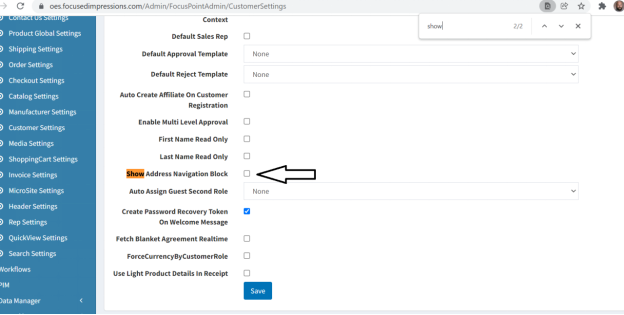
Show Address tab, under my account:
FP >> Customer Settings
check Show Address Navigation Block
Search on Emporium:
CSS:
.search-box input.search-box-text {
width: calc(100%) !important;
}
OR BETTER YET DO THIS:
Enter Javascript On Ready
var searchboxinput = document.getElementById('small-searchterms');
searchboxinput .style.width = "100%";
Missing Kendo Grid icons (Hernon)
.k-widget *:before, .k-widget *:after {
font-family: inherit !important;
box-sizing: border-box !important;
}
Check Box on Save Cards with Auth.net
.checkout-data input[type="checkbox"] {
margin-top: -10px;
left: 755px !important;
}
Sometimes its this:
#SaveCard {
left: 655px !important;
}
Hide Customer Info under My Account
CSS:
.customer-info {
display: none !important;
}
and then in then
Enter Javascript On Ready - change the text in red
$('.ico-account,a[href="/customer/info"]').attr('href','/order/history');
Costumer Info - Redirect to Addresses
$('.ico-account,a[href="/customer/info"]').attr('href','/customer/addresses');
Emporium Login - Hide Register - Center Login
.new-wrapper.register-block {
display: none !important;
}
.login-page .returning-wrapper form {
float: none !important;
}
Emporium Header - Gap on Mobile
@media all and (max-width: 1024px) {
.admin-header-links ~ .responsive-nav-wrapper-parent {
top: 0px !important;
}
.admin-header-links ~ .responsive-nav-wrapper-parent ~ .header {
margin-top: 65px !important;
}
.admin-header-links {
top: 60px !important;
}
}
***If you see this in the mobile gap CSS, please remove:***
.header-lower {
display: none !important;
}
It grays out the cart in mobile view:
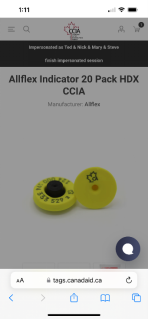
Remove Paypal icon from footer
.pay-options img:last-child
{
display: none;
}
When entering a new shipping address - dont prefill email, name, company
Put in Enter Javascript On Ready
document.getElementById('ShippingNewAddress_FirstName').value = ""; document.getElementById('ShippingNewAddress_LastName').value = ""; document.getElementById('ShippingNewAddress_Email').value = ""; document.getElementById('ShippingNewAddress_Company').value = "";
Adding Background Graphic to Login Page (Emporium)
(Customize highlighted elements to the customer)
/* login page with background image */
.html-login-page .master-wrapper-content {
padding: 70px 6vw;
background: url(/images/uploaded/Preserve-banner_1000.jpeg) center center / cover no-repeat fixed #fff;
}
.login-page .page-title h1 {
color: #fff !important;
}
.login-page .title strong, .registration-page .title strong {
font-size: 18px;
color: #263c13 !important;
font-weight: bold !important;
}
.login-page .returning-wrapper form, .login-page .new-wrapper {
background: #fff !important;
opacity: 0.9 !important;
}
.login-page .returning-wrapper form .title, .login-page .new-wrapper div.title {
opacity: 1.0 !important;
}
/* end login page with background image */
How to move objects with Javascript on Ready
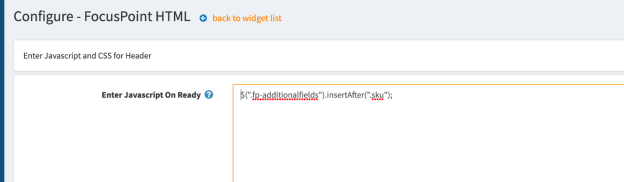
Move objects with Javascript on Ready.
Use the class name of the object you want to move (add . before the name) insertAfter or insertBefore the final class. (see red text)
$(".fp-additionalfields").insertAfter(".sku");
Examples:
$(".fp-additionalfields").insertAfter(".sku");
$(".manufacturers").insertBefore(".product-name");
Emporium - Hide New Registration and Center Login
Hide New Registration and Center the Login Screen
.header-form-holder a.ico-register, .login-page .new-wrapper {
display: none !important;
}
.login-page .returning-wrapper form {
float: none !important;
}
Full Width Topic Pages
/* full width topic pages */
.html-topic-page .master-wrapper-content {
padding: 0 0 50px 0 !important;
}
.html-topic-page .topic-page-body {
max-width: 100% !important;
}
.html-topic-page .page {
min-height: auto !important;
}
/* end full width pages */
Sticky Nav on Emporium (with Nella Menu)
Put this in the Javascript On Ready panel:
$(window).scroll(function () {
var scroll = $(window).scrollTop();
if (scroll >= 100) {
//clearHeader, not clearheader - caps H
$(".header-menu-parent").addClass("header-sticky");
}
else {
$(".header-menu-parent").removeClass("header-sticky");
}
if (scroll >= 40) {
$(".responsive-strip").addClass("fixed-header");
$(".menu-button").addClass("fixed-header-menu");
$(".header-flyout-cart").addClass("fixed-flyout-cart");
} else {
$(".responsive-strip").removeClass("fixed-header");
$(".menu-button").removeClass("fixed-header-menu");
$(".header-flyout-cart").removeClass("fixed-flyout-cart");
}
});
Put this in the CSS panel:
/* sticky nav css */
@media(min-width:1025px) {
.header-menu-parent.header-sticky{
position: fixed;
top: 0;
width: 100%;
animation: slide;
animation: slide-down .1s;
}
}
.header-menu-parent.header-sticky.header-menu {
/*box-shadow: 0 0 14px rgb(0 0 0 / 20%);*/
}
.responsive-strip.fixed-header, .menu-button.fixed-header-menu, .header-flyout-cart.fixed-flyout-cart {
top: 0;
}
/* end sticky nav css */
Redirect Home page to another in Javascript
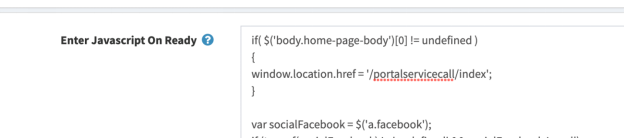
if( $('body.home-page-body')[0] != undefined )
{
window.location.href = '/portalservicecall/index';
}
Change the highlighted content to the page you want the new home page to be.
Long Description Videos Cut off in Mobile View (like Kego Sleep Noodle)
@media all and (max-width: 769px) {
.full-description iframe {
width: 100%;
}
}
Custom Mobile Footer with Collapsible Panels (ex. Streakwave/Allied)
1. Add class (.footer-block) to the custom footer HTML widget.
2. Add CSS:
.footer-block .list a {
display: block;
padding: 10px 15px;
line-height: 10px;
}
@media (min-width: 481px) {
.footer-block {
display: inline-block !important;
width: 41.5% !important;
margin: 0 4% !important;
vertical-align: top !important;
}
.footer-block .title {
padding: 0 0px 5px !important;
}
.footer-block .list a {
display: inline;
padding: 0;
line-height: 1px !important;
}
}
.custom-footer{
display: flex;
flex-wrap: wrap;
}
@media (max-width:480px){
.footer-block{
width:100%;
text-align: center;
}
.custom-footer{
padding:0;
}
}
@media (min-width:481px) and (max-width:768px){
.footer-block .list a{
line-height: normal;
}
}
@media (min-width:768px) and (max-width:1204px){
.footer-block{
width: 25% !important;
}
.footer-block .title{
padding:0px !important;
}
}
@media (min-width:1025px){
.footer-block{
width: 16.5% !important;
margin:0px !important;
}
.custom-footer{
justify-content: space-between;
}
}
@media screen and (max-width: 480px) {
.html-widget .shopNow{
margin: 0 !important;
padding: 10px 10px 10px 10px !important;
text-align: center !important;
height: auto;
width:100% !important;
}
}
@media (min-width:321px) and (max-width:480px){
.html-widget .shopNow{
width:100%;
margin:auto;
text-align:center;
}
}
Venture Theme - Category Page Grid View Icon Missing
When the Category Page Grid View Icon is Missing on Venture theme:
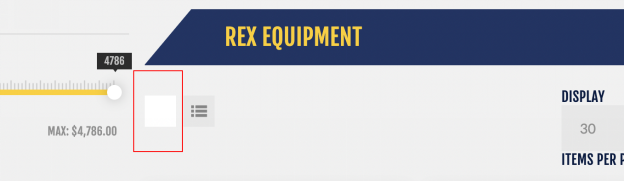
/* Category Page Grid View Icon Missing */
.product-selectors .product-viewmode a.grid:before {
content: "M";
color: #858585 !important;
}
.product-selectors .product-viewmode a.grid{
background-color: #e7e7e7 !important;
}
.product-selectors .product-viewmode a.grid:hover{
background: #D5D5D5 !important;
}
/* End Category Page Grid View Icon Missing */
To Fix Uptown My Account Menu
When the Menu on uptown looks like this:
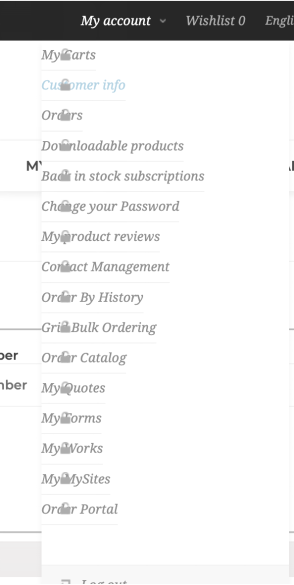
ADD THIS CSS:
/* UPTOWN MENU FIX */
.my-account-dropdown a:before
{
background-image: none !important;
}
.my-account-dropdown a:hover:before
{
background: none !important;
}
@media (min-width: 1025px)
{
.header-links .my-account-dropdown ul
{
margin-left: 10px !important;
}
}
.header-links .my-account-dropdown a {
border-bottom: none !important;
}
/* END UPTOWN MENU FIX */
When entering a new shipping address - dont prefill (email...)
Enter Javascript On Ready
//When entering a new shipping address - dont prefill email, name, company
if ($('#ShippingNewAddress_FirstName').length)
{
document.getElementById('ShippingNewAddress_FirstName').value = "";
}
if ($('#ShippingNewAddress_LastName').length)
{
document.getElementById('ShippingNewAddress_LastName').value = "";
}
if ($('#ShippingNewAddress_Email').length)
{
document.getElementById('ShippingNewAddress_Email').value = "";
}
if ($('#ShippingNewAddress_Company').length)
{
document.getElementById('ShippingNewAddress_Company').value = "";
}
Inserting CSS into a specific page
Examples:
1. Hiding subcategories on 1 category for Wallquest "Brands & Collections"
2. Hiding thumbnail gallery on some product pages for Lowry "Pro Grip Tape"
3. Hiding Out of Stock message only some product pages for Lowry
1. In All Settings, set these 2 to True:
adminareasettings.richeditorallowjavascript
adminareasettings.richeditorallowstyletag
2. Create an HTML widget and add this to the source code:
3. Set widget zone and condition to limit to specific category or product
Kendo Icon Issues
For kendo icon issue, please add below css block to your view.
.k-icon::before, .k-icon::after {
font-family: inherit !important;
box-sizing: border-box !important;
}
Search Formatting Error on Emporium Portal Pages
/* EMPORIUM kendo fixes */
.k-fieldselector .k-list .k-item, .k-item.k-drag-clue, .k-list-optionlabel, .k-listbox .k-item, .k-popup .k-list .k-item, .k-popup>.k-group-header, .k-popup>.k-virtual-wrap>.k-group-heade {
line-height:unset !important;
}
.k-popup.k-calendar-container, .k-popup.k-list-container {
padding: 2px;
border-width: 0px !important;
}
.k-autocomplete, .k-dropdown-wrap, .k-multiselect-wrap, .k-numeric-wrap, .k-picker-wrap {
border-width: 0px !important;
}
.search-box input.search-box-text {
width:calc(100% - 2px) !important;
}
.search-box input.search-box-text {
height:40px !important;
}
.k-dropzone, .k-fieldselector .k-list .k-item, .k-list .k-state-focused, .k-list .k-state-highlight, .k-list .k-state-hover, .k-list .k-state-selected, .k-list-optionlabel, .k-listbox .k-item {
border-radius: 0px !important;
}
.k-grid-header th.k-state-focused, .k-list>.k-state-focused, .k-listview>.k-state-focused, .k-state-focused, td.k-state-focused {
box-shadow: inset 0 0 0 0 #aeaeae !important;
}
.k-dropdown .k-state-focused, .k-filebrowser-dropzone, .k-list>.k-state-hover, .k-pager-wrap .k-link:hover, .k-scheduler .k-scheduler-toolbar ul li.k-state-hover, .k-splitbar-horizontal-hover, .k-splitbar-vertical-hover, .k-state-hover {
background-color: #fff !important!;
border-width:0px !important;
border-color: #fff !important!;
}
/* END EMPORIUM kendo fixes */
GIG Guest Registration for Brand (Store)
Step 1: Go to every store Configuration that requires the current BLOCK of registrations
Repeat this for each store where we want to enforce no guest access
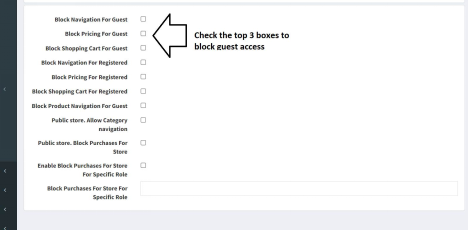
Step 2 – Pierre/Charles – this part you have to do in SQL
Use the tables PermissionRecord and PermissionRecord_Role_Mapping (46,47,48,49)to remove the tenant wide block of guests for nav, pricing, and shopping cart. This is cached, so once you do this, you will have to restart the site.
Any site without the step 1 block will allow anonymous access to hit it.
Step 3 – Go to Configuration >> Settings >> Order Settings
Select the Store
Check the box for Anonymous checkout allowed
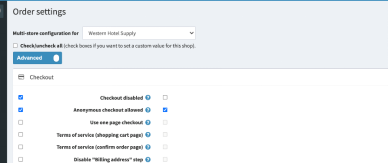
Step 4: Go to FocusPoint >> Administration >> CustomerSettings
Select the Store
UNCheck the box for for Consolidate Login And Register
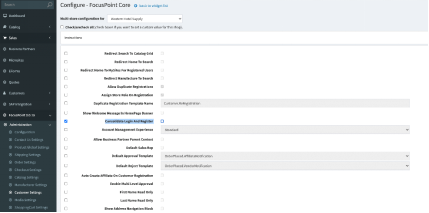
If you want the site locked down -
in the store settings check these three boxes
Block Navigation For Guest
Block Pricing For Guest
Block Shopping Cart For Guest
Add the customer role to the: Require Role To Access Store
Was this article helpful?
That’s Great!
Thank you for your feedback
Sorry! We couldn't be helpful
Thank you for your feedback
Feedback sent
We appreciate your effort and will try to fix the article