One-time Credit Card allows for easy integration with iPayment.
When using the one-time Credit Card integration, the credit card token will be associated with a specific
document instead of the business partner.
The integration is done using a user defined table (UDT) where the third-party system writes data.
iPayment will check the user defined tables periodically and fill the iPayment tables using the data.
Boyum IT A/S - iPayment - documentation
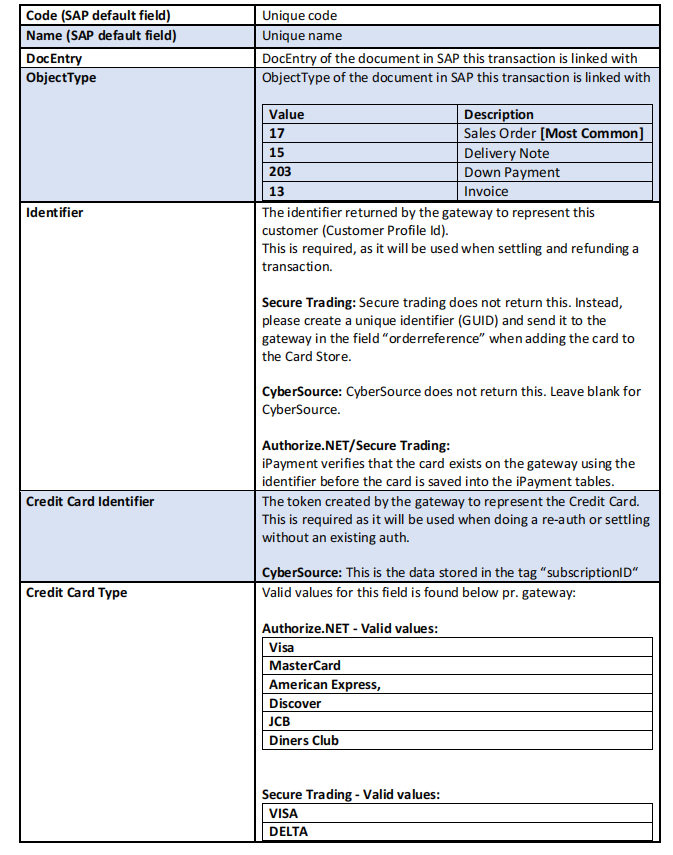
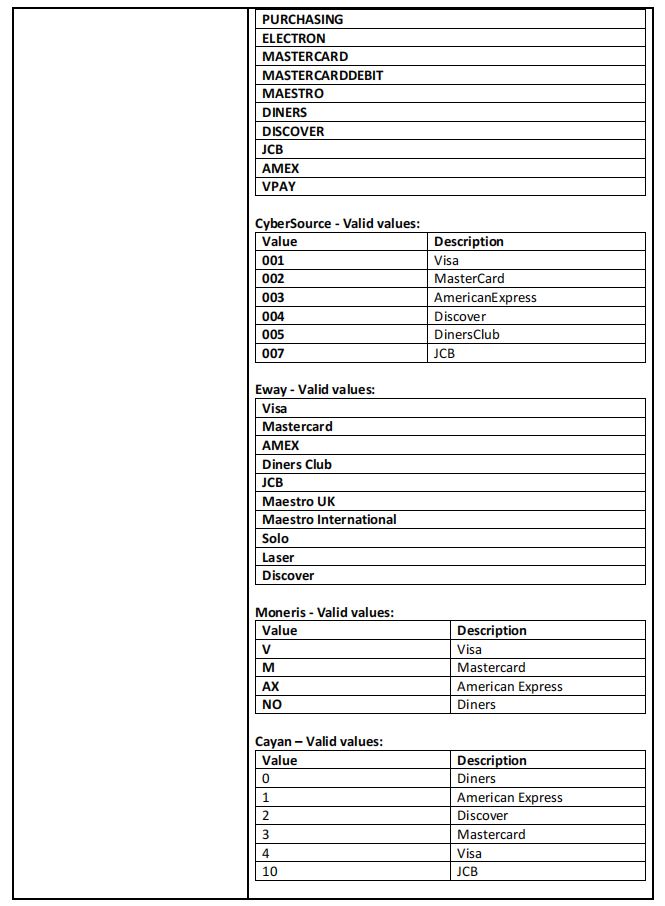
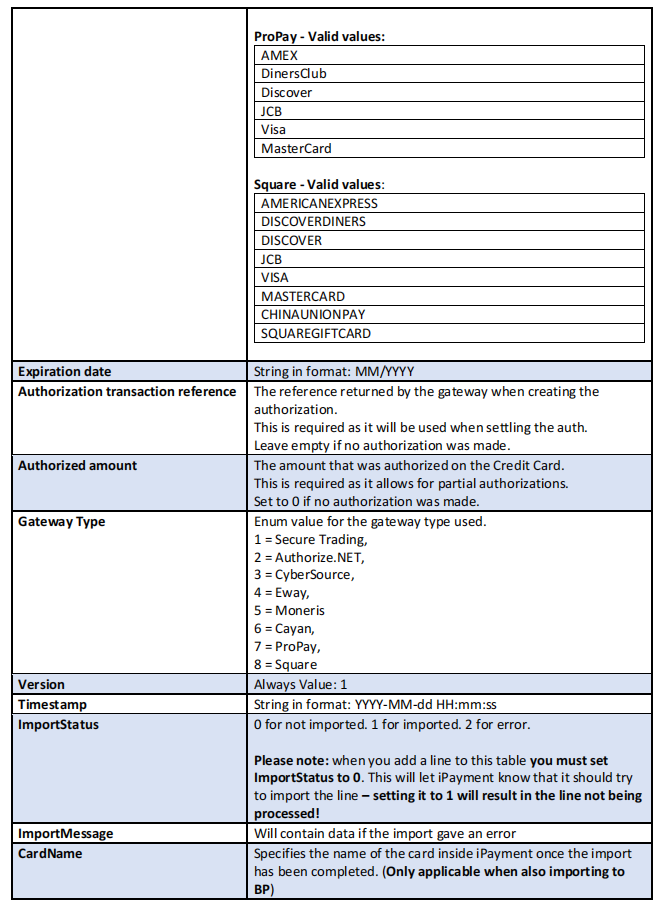
Integration table description:
The user defined table is created by iPayment when run in the database and have the following structure:
Boyum IT A/S - iPayment - documentation
Boyum IT A/S - iPayment - documentation
Boyum IT A/S - iPayment - documentation
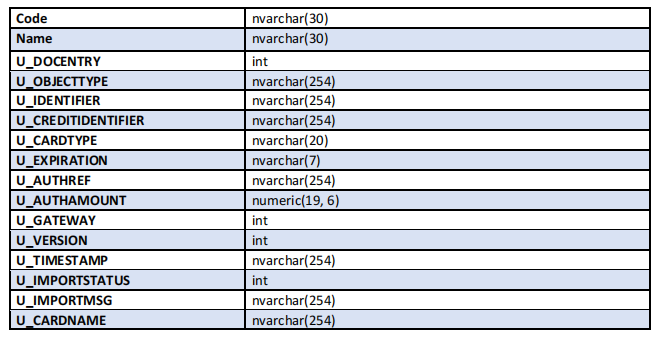
Integration table definition:
Tablename: [@BOY_E0_OTCINTE]
UDFs on the linked document
To ensure that the OTC integration is properly linked to the document, it is recommended that you set the
following UDFs with the specified values. This will likely be done by your third-party application that
handles the authorizations outside of iPayment.
U_BOY_E0_CCPAYEX = “Y”
U_BOY_E0_ONETIMCC = “Y”
CyberSource additional information
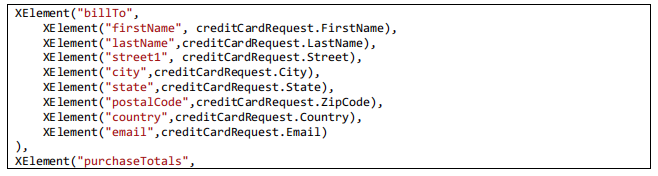
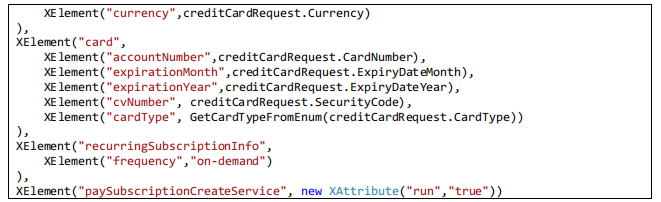
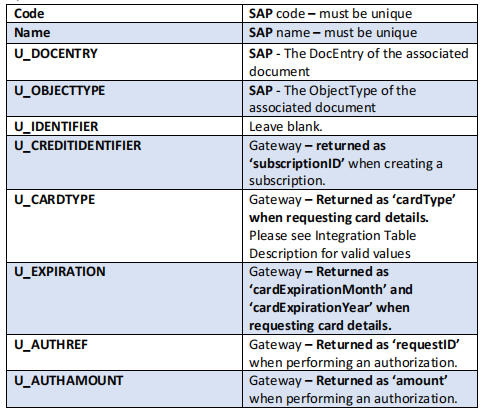
iPayment uses the “recurringSubscriptionInfo” object to tokenize the Credit Card data. The token should be
generated with “frequency” = “on-demand” and “paySubscriptionCreateService” = “true”. The returned
“subscriptionID” should be saved into the integration table.
Adding the Credit Card and getting the token is possible using the XML API
(The C# example below is missing the header + soap wrapper).
Boyum IT A/S - iPayment - documentation
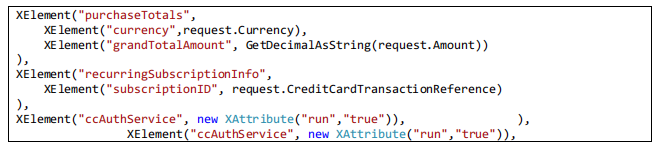
Authorizing on the returned “subscriptionID” is possible using the XML API.
The returned ”requestID” should be added to the “Authorization transaction reference” field in the
integration table.
(The C# example below is missing the header + soap wrapper).
You can find the full documentation here:
http://apps.cybersource.com/library/documentation/dev_guides/Payment_Tokenization/SO_API/Payment_Tokenization_SO_API.pdf
Field mappings
Note: for Secure Trading it is important that you use the correct settlestatus when creating the transaction
to be used with the integration. You must use a settlestatus of 2 to prevent the authorization from being
automatically captured.
https://docs.securetrading.com/document/api/essentials/settlement/
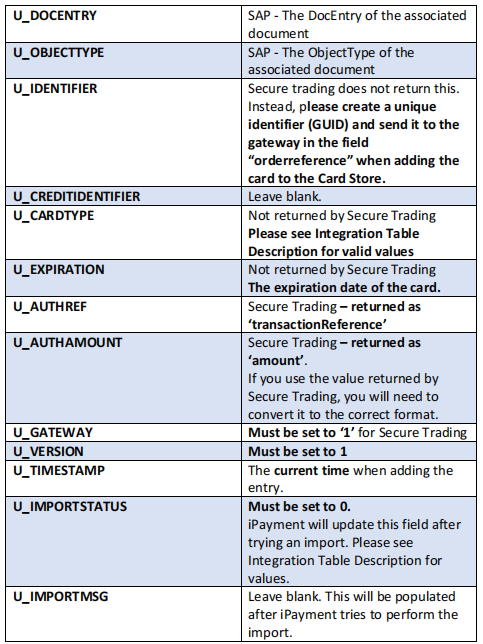
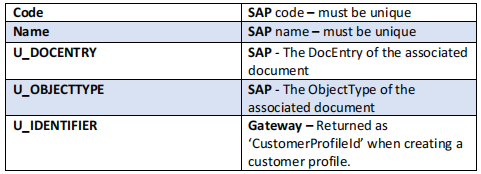
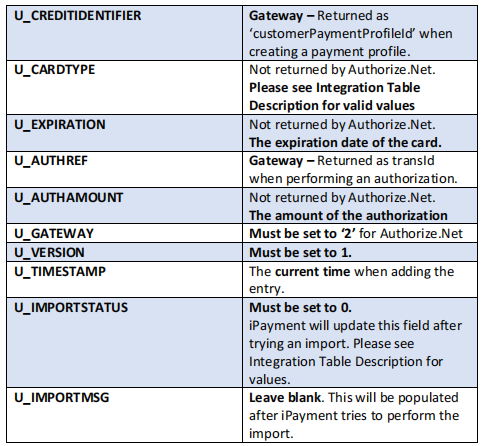
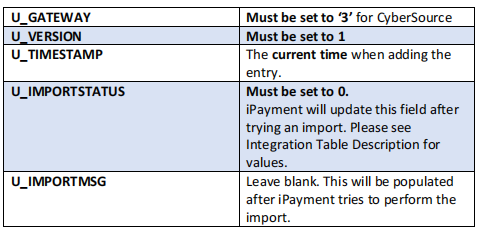
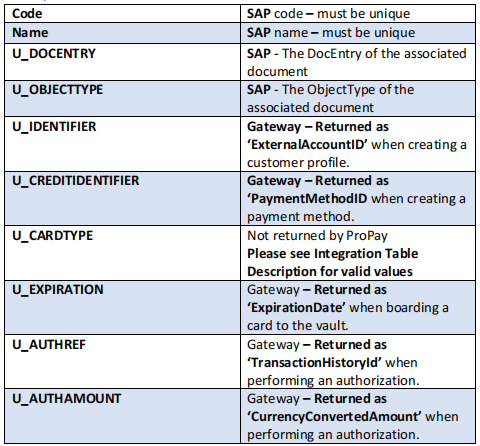
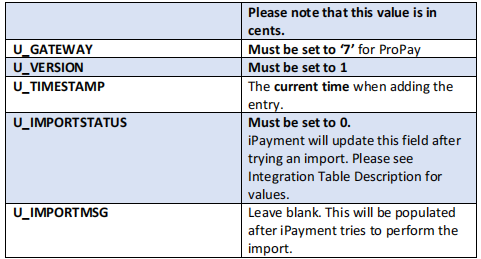
Here is a description of the specific fields you need to map to each field in the table, depending on the
gateway you’re using.
Some of these fields will be returned when you are creating the token, while others will be returned when
you’re doing an authorization on the card.
Depending on your 3rd party integration, these fields may have varying names. The names we use here are
the names as they are returned directly from the gateway
Secure Trading

Boyum IT A/S - iPayment - documentation
For further details see:
https://prsiteimages.blob.core.windows.net/fpsite/article/8ccv3t3-50313/stpp_xml_specification_c2058e65.pdf
Boyum IT A/S - iPayment - documentation
For further details see:
https://developer.authorize.net/api/reference/index.html
CyberSource
Boyum IT A/S - iPayment - documentation
Eway
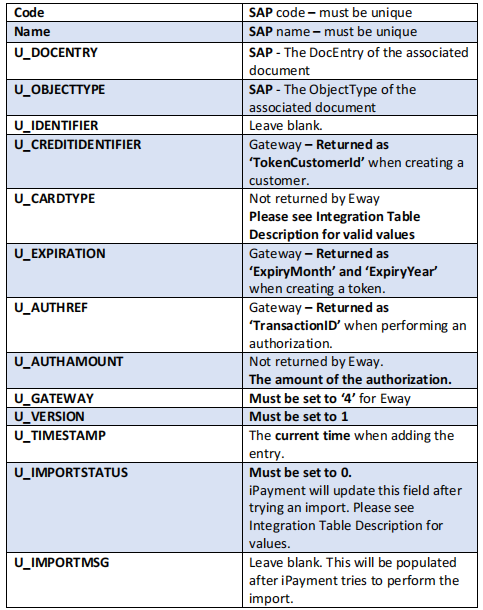
For further details see:
https://eway.io/api-v3/#api-reference
Boyum IT A/S - iPayment - documentation
Moneris
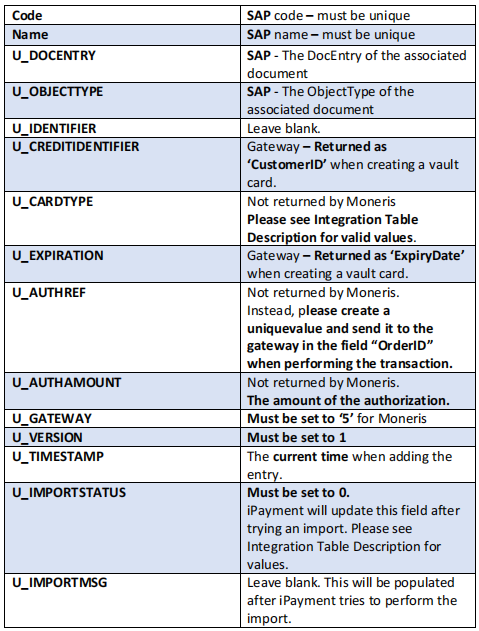
For further details see:
https://developer.moneris.com/en/Documentation/NA/E%02Commerce%20Solutions/API
Cayan
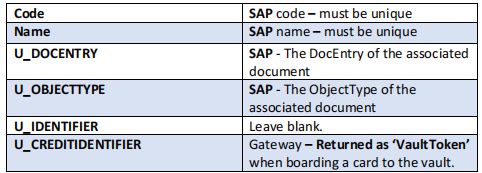
Boyum IT A/S - iPayment - documentation
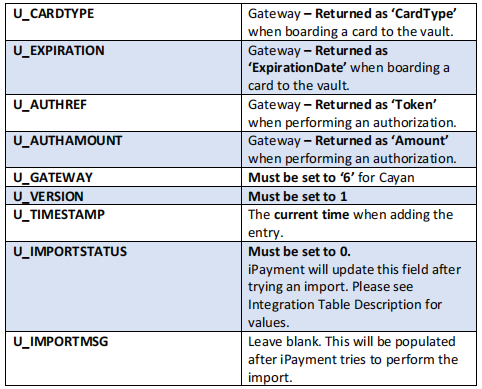
For further details see:
https://www.globalpaymentsintegrated.com/en-us/solutions/embedded-commerce/semi-integrated/merchants#serviceinformation
ProPay
Boyum IT A/S - iPayment - documentation
Boyum IT A/S - iPayment - documentation
Square
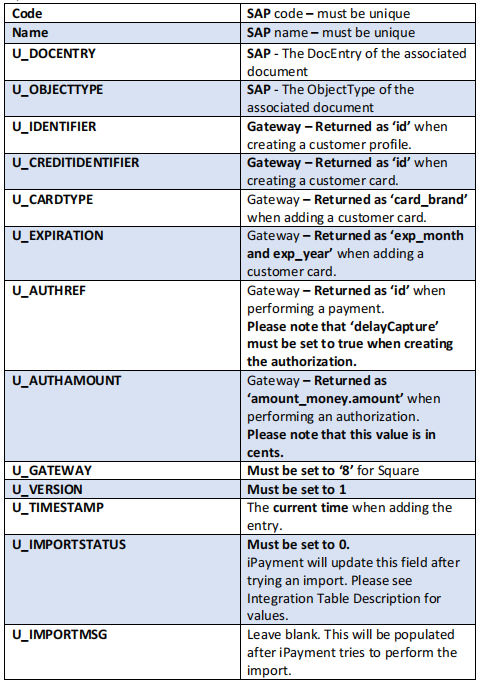
For further details see:
https://developer.squareup.com/reference/square
Boyum IT A/S - iPayment - documentation
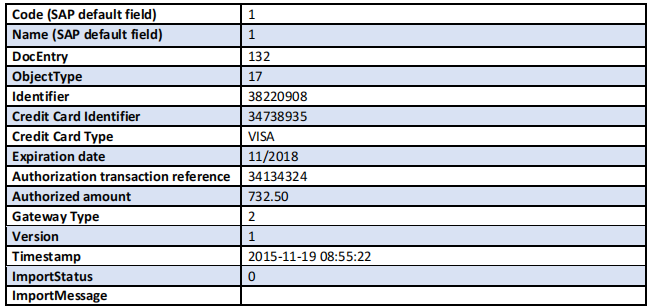
Example Authorize.NET
A record created by a third-party system using Authorize.NET would look like (Where the code and name is
unique as required by SAP):
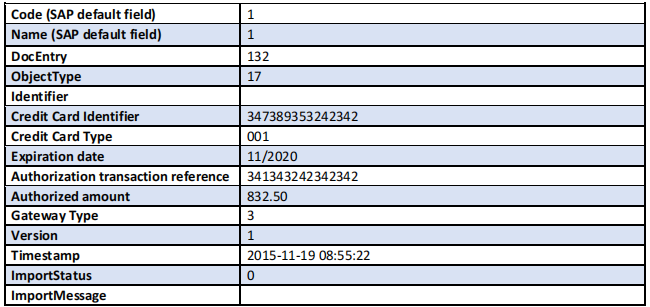
Example CyberSource:
Was this article helpful?
That’s Great!
Thank you for your feedback
Sorry! We couldn't be helpful
Thank you for your feedback
Feedback sent
We appreciate your effort and will try to fix the article