Overview
Now, anyone can get their products listed on Google Shopping for free with a few simple steps. Keep in mind, Google controls when your products are triggered based on the information you provide, so it is crucial to have accurate product titles and descriptions. However, you should already be doing this as part of your SEO strategy.
In FocusPoint, you can set up a shopping feed that automatically connects to a Google Merchant Center account that would feed your products to Google so they can be used in Google Shopping.
Step 1: Set up a Merchant Center Account
A Merchant Center Account is how you share your products with Google. You can use the same account and products for paid ads as well. You will just need to link your Google Ads and Merchant Center accounts. You’ll be able to track performance in here too so you’ll know what type of impact Google Shopping has on your business.
Step 2: Install the Google Shopping plugin for FocusPoint
The FP team will do this for you.
A Note About the Feed
The formatting and information included in the feed is important. If there are any issues with either, your products will not be shown by Google.
Google needs the following things included with every product for it to be eligible to show:
-
* Product IDs (like a SKU number)- Accurate product titles that match the title on the landing page
- A product description
- The product’s landing page url
- A link to the product image
- Product stock availability
- Accurate product pricing that matches the pricing on the landing page.
- Branding for the product (not needed for books, movies, recordings)
- A valid GTIN as defined by official GS1 requirements
- Condition (for used or refurbished products)
Once the feed is set up, you can go into Merchant Center and then on the left select Products > Feeds and you can manually upload your spreadsheet or set up a schedule for Google to get it automatically.
Step 3: Check the Diagnostics
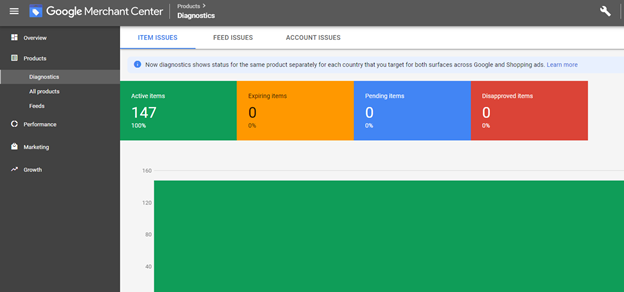
After your products have been loaded into Merchant Center (this can take up to a day), go into Products > Diagnostics and make sure that none of your products are disapproved. This will happen if you’re missing any of the required information.
Was this article helpful?
That’s Great!
Thank you for your feedback
Sorry! We couldn't be helpful
Thank you for your feedback
Feedback sent
We appreciate your effort and will try to fix the article