How-To Instructions: Logging in to Your FocusPoint Admin Setup Portal
1. Your unique ecommerce development site and team log in details
2. how to change your password
3. how to add team members to have admin access
4. SETUP USER GUIDE – REFERENCE DOCUMENTATION
1. YOUR UNIQUE ECOMMERCE DEVELOPMENT SITE
- URL to dev site: enter here
- URL to administrative login page: enter here
| Dev Site Access |
|---|
| Username |
| Email 1 |
| Email 2 |
| Email 3 |
| Email 4 |
| Email 5 |
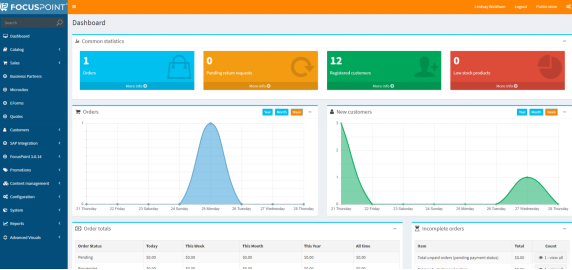
Once you log in as an administrator, here is the page you will see—most notably, the left-hand Navigation panel, and the Dashboard:
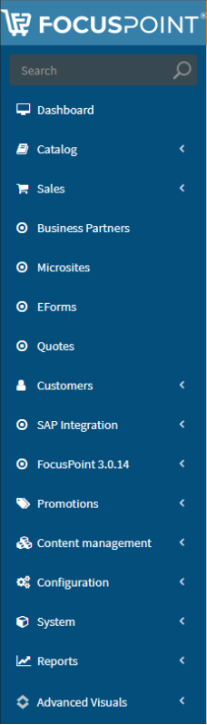
You can navigate to various settings using the links on the left-hand panel; note that anything with a
< mark indicates that there is additional sub-navigation categories within that header that you can click to expand:

2. HOW TO CHANGE YOUR PASSWORD
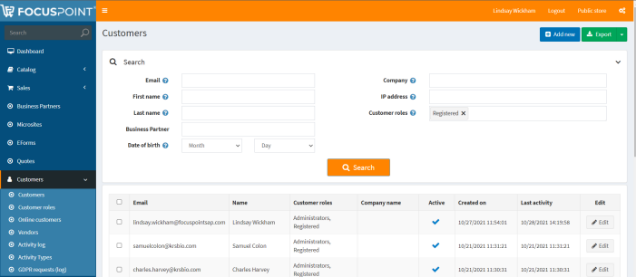
- On the left-hand nav panel, selected Customers (a dropdown will appear)
- Select ‘Customers’ again to see below screen
- To edit an existing Customer, select Edit to the right-side of their name (circled in red below)
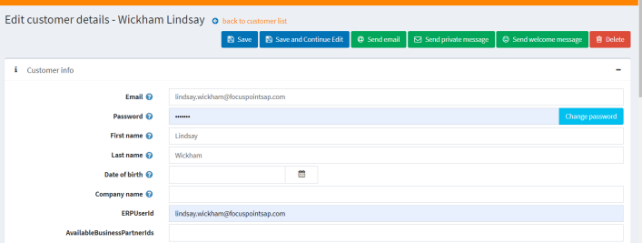
- This is where you can enter a new Password for yourself, then click ‘Change Password’ and then ‘Save’ to enable it
- You can also select and edit Customer Roles here
Visual of the Customers home screen. Click Edit to the right of an entry to modify details of a user, including their Password.
Visual of where the Password change is:
3. HOW TO ADD TEAM MEMBERS TO HAVE ADMIN ACCESS
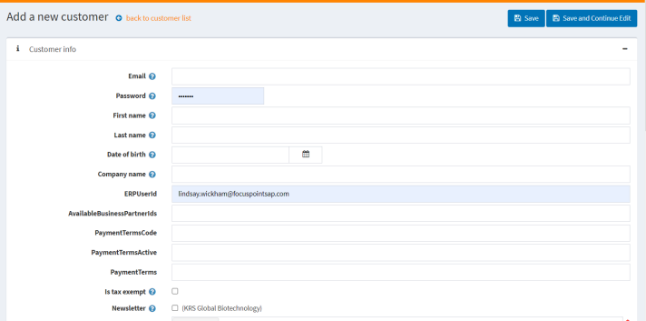
- To add a new customer, select the +Add New button at the top right-hand side of the screen
Visual of the +Add New screen. You must enter an email and we recommend adding the First and Last Name of the new user. We recommend that the ERPUserID should be their email address.
You must click ‘Save’ or ‘Save and Continue’ to save any changes.
4. SETUP USER GUIDE – REFERENCE DOCUMENTATION
- · Complete FocusPoint User Guide and Reference Documentation: http://docs.focuspointsap.com/
- Quick links by section
- FocusPoint step-by-step setup notes
- SAP setup notes
- Release notes
- This shows any added features/functionality based on the release number of the product
During your project implementation, you may have questions about the training sessions or where to find specific items within the FocusPoint or SAP setup. This guide can help you navigate those questions.

- This shows any added features/functionality based on the release number of the product
- Quick links by section
Was this article helpful?
That’s Great!
Thank you for your feedback
Sorry! We couldn't be helpful
Thank you for your feedback
Feedback sent
We appreciate your effort and will try to fix the article