1. COMPLETING THE OCRD TAB
- OCRD – BusinessPartners – You can use this tab to fill out your Business Partners.
- For this tab we need;
- The card code
- Web enable yes or no
- The Customer Role
- There is no need to include BPs that will not be web enabled. If they are left blank they will not be web enabled
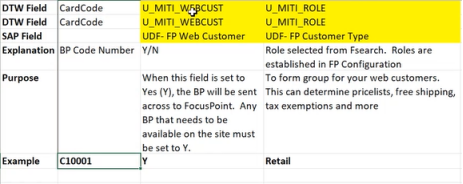
- For this tab we need;
2. COMPLETING THE OCPR TAB
-
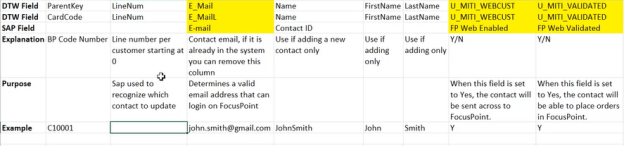
  *   OCPR – ContactEmployees – You can use this tab to fill out your Contacts.
  *   For this tab we need;
      *   The card code
      *   We need a line number for the contacts
          *   1. Mohammed has a query to populate the line number
      *   The contacts email address
          *   1. Only for new contacts, the email address is needed
          *   2. each contact can only have 1 email address
      *   The contacts first name
          *   1. Only for new contacts, the first name is needed
      *   The contacts last name
          *   1. Only for new contacts, the last name is needed
      *   web enable y/n
      *   web validated y/n
3. COMPLETING THE OITM TAB
- OITM – Items – You can use this tab to fill out your Item Master.
- For this tab we need;
- Item code which is the item sku
- Web enable y/n
- The item config code which is normally the same as the sku
- If there is a parent/child relationship we need to specify the parent SKU
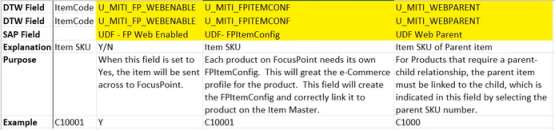
- For this tab we need;
Was this article helpful?
That’s Great!
Thank you for your feedback
Sorry! We couldn't be helpful
Thank you for your feedback
Feedback sent
We appreciate your effort and will try to fix the article