How-To Instructions: Registering Customers in SAP and FocusPoint
1. Registering a New Customer in SAP
2. Registering a New Customer in FocusPoint
1. Registering a New Customer on SAP
https://docs.focusedimpressions.com/customers-5
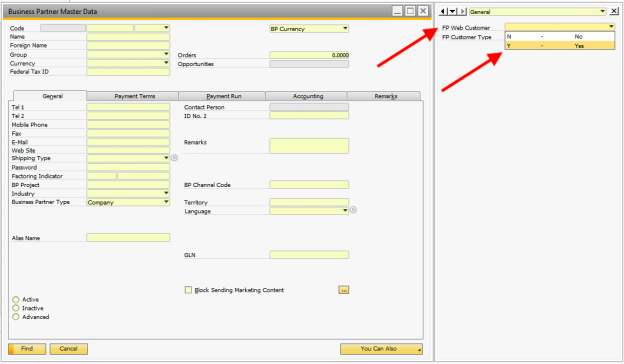
2 UDFs in Business Partner Master Data:
- FP Web Customer
- ‘Y’
- Select ‘Y’/’Yes’ to send BP to FocusPoint & site
- FP Customer Type
- Select from dropdown
- Do not have to select this; Enabling FP Web Customer is enough
- Click Update
***
FP Web Customer = Business Partner
Contacts = Users
Customer Type = Customer Role
Business Partners in FocusPoint = Business Partners in SAP
Customers in FocusPoint = Contact Persons in SAP
Can search for Customer (in FP) by Business Partner #
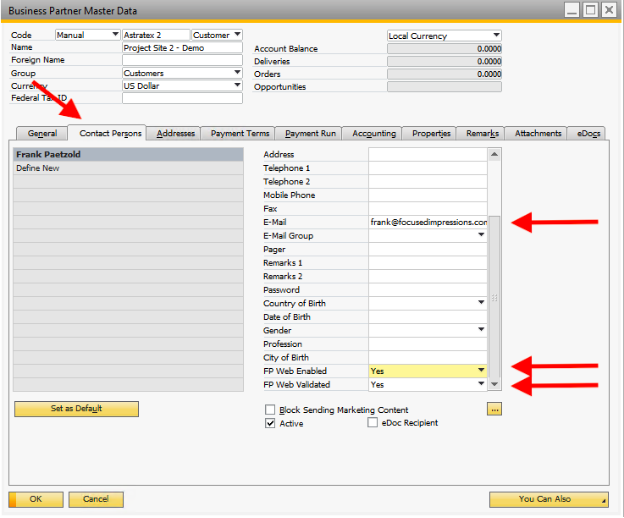
Contact Persons
- Web enabled & web validate
- Add Email - most important
- BP # becomes customer role in FocusPoint
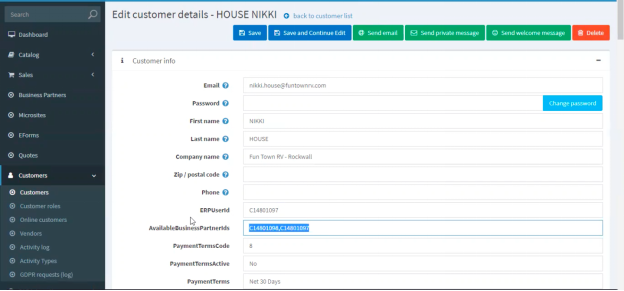
- ERPUserId = SAP Business Partner #
- Have to be individually web enabled & web validated on SAP
- Email is most important part of contact
- Available on FP
2. Registering a New Customer on FocusPoint
-
* If contact exists on multiple BPs → ‘AvailableBusinessPartnerIds’ (on FocusPoint) have list of BP #s
- Drives customer experience
- Drives which site you see
-
* Customer Roles has BP id
- Drives price list & visibility
***Roles drive pricing***
-
* Switch BPs → switch customer roles
- ACL will work
-
DTW to bulk load contacts & BPs
-
Welcome message
- Can go to individual customers on FP & automate email
- Sent out to emails; customers can reset password
- Password Recovery
- Content management → message templates
- Pre-filled message
- Bulk activate people already in SAP -
New Registrations:
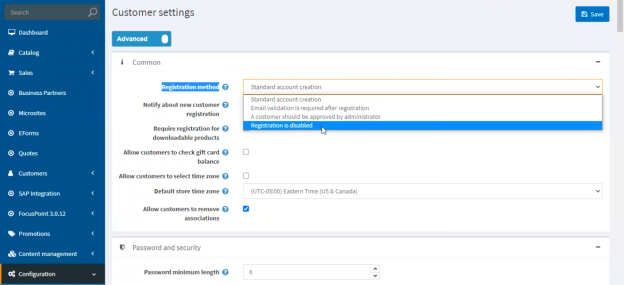
- Customer Settings (FP) → Registration method -
Registration Methods:
1. Standard Account Creation
i. Get default price list
a. Do not get special pricing
b. Good for B2C (& B2B who want to show only default price list)
c. Create account on site - Register on registration screen → FocusPoint account
i. Account will get sent to SAP at time of Sales Order creation
1. Creates BP automatically (after purchase)
2. Email validation is required after registration
a. Customers must respond to message sent to their email to validate their email address
3. A customer should be approved by Administrator
a. Administrator email gets notification
b. ‘New user request’
i. Approve access
1. Sends to SAP → bypass approval step → auto-installed as contact on Business Partner
4. Registration is disabled
a. Only through SAP
b. Everyone originates from SAP
c. Website registration is disabled
-
Want someone to join an existing BP:
-
Create workflow to register
-
Enter company administrator email’
-
eForms
- Unique registration workflow -
Administrator gets notification in inbox
- ‘New User Request’ -
Can approve newly requested access
- Goes to SAP with new BP id
- Bypasses approval step
- Contact is both web enabled & web validated
- Now has access to correct price list & products -
eForms
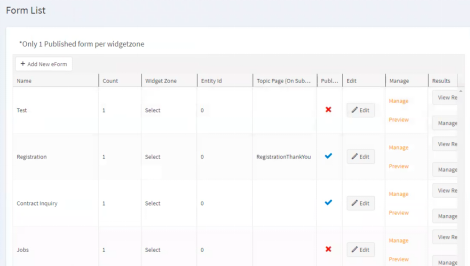
- Create Workflow for unique registration process
- System fields
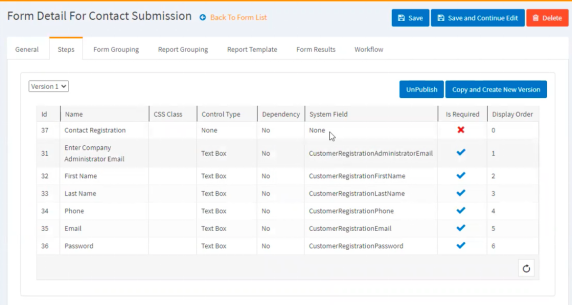
- Ex. want a form to collect minimal information
- Workflow tab - comes pre-loaded
- Select from ‘Add System Workflow’ dropdown
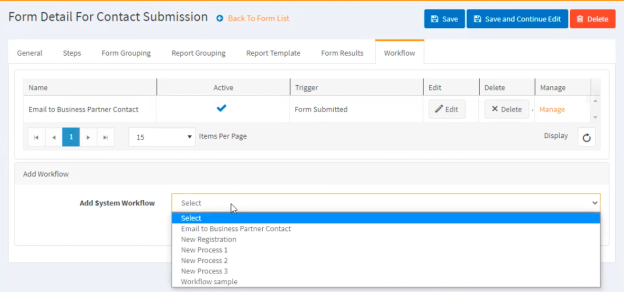
- Configure the triggers
- Ex. Form submitted
- Action happens via workflow to notify customers
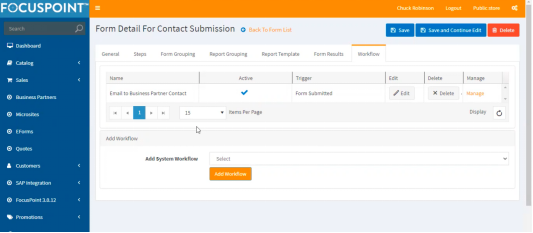
- End state: Customers in FocusPoint with correct Customer Role assigned to them
- DTW can be done to mass populate BPs & Contact Persons
Was this article helpful?
That’s Great!
Thank you for your feedback
Sorry! We couldn't be helpful
Thank you for your feedback
Feedback sent
We appreciate your effort and will try to fix the article