1. UDF needed in SAP:
On the BP master data with valid values:
0 = Do not allow Backorders
1 = Allow Backorders
2 = Allow qty below 0 and notify the customer
2. Additional Field Mapping in FP:
SAP Field Name = Backorder
FocusPoint Field Name = BackorderModeId
Entity Name = Customer
Direction = Inbound
Formula = CustomerLogistics;BackorderModeId
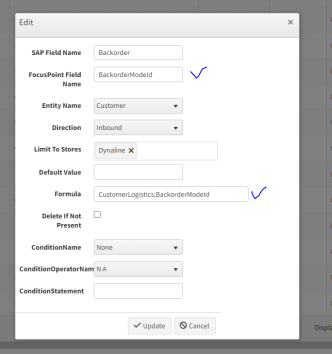

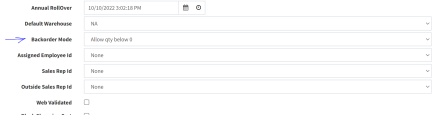
This is binded to the customer generic attribute (Backorder=Yes) to below backorder mode). SAP sends backorder mode (0,1,2). A combo selection for backorder modes is on customer detail administrator tab
Additional Field Mapping in SAP:
Was this article helpful?
That’s Great!
Thank you for your feedback
Sorry! We couldn't be helpful
Thank you for your feedback
Feedback sent
We appreciate your effort and will try to fix the article