How-To Instructions: Add Special Pricing to A Customer Group/Business Partners
1. OVERVIEW AND REFERENCE POINTS ON FOCUSPOINT USER SETUP DOCUMENTATION SITE
2. FOCUSPOINT DISCOUNT BY CUSTOMER GROUP
3. SAP SPECIAL PRICING FOR BUSINESS PARTNERS
1. OVERVIEW AND REFERENCE POINTS ON FOCUSPOINT USER SETUP DOCUMENTATION SITE
-
* Overview of Discount by Customer Group in FocusPoint and what it looks like on the front end to a customer: [http://docs.focuspointsap.com/discounts](http://docs.focuspointsap.com/discounts)
2. FP DISCOUNT BY CUSTOMER GROUP
-
* If it’s not customer specific, you can set the discount by group in FocusPoint
Select Promotions > Select Discounts > Add new or Edit an existing
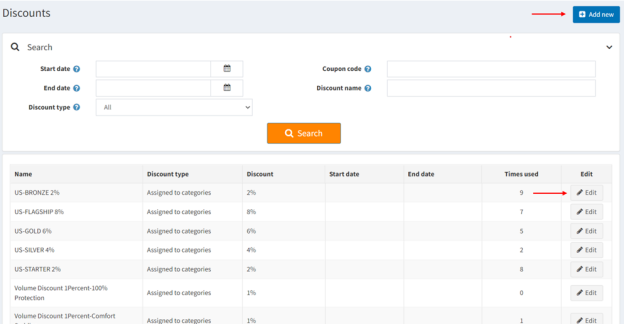
To add a new discount, click +Add new and complete the following details within the Discount Info and Requirements fields:
Discount Info Fields
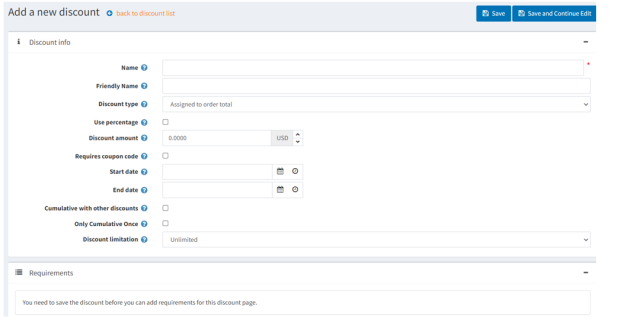
How to configure the discount:
- Select a name for the Promo/Sale
- Select a Discount type (assigned to: order total, products, categories, manufacturers, shipping, or order subtotal)
- Select if you want to use a percentage for the Discount (check box and enter discount)
- Select if you want a maximum Discount, enter it here
- Select if you want then to enter a coupon code for the discount (check box and enter code)
- Select if you want start and end date of the promo/sale
- Select if you want the promo/sale to be valid with other discounts (check box if so)
- Select if you want a limit to the discount, if you select N times, enter the amount of N
- Click 'Save and Continue' before adding in any Requirements
Requirements Fields
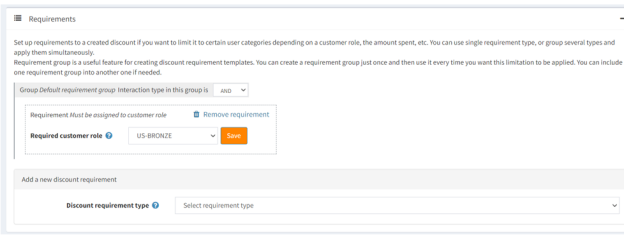
Set up requirements to a created discount if you want to limit it to certain user categories depending on a customer role, the amount spent, etc. You can use single requirement type, or group several types and apply them simultaneously.
Requirement group is a useful feature for creating discount requirement templates. You can create a requirement group just once and then use it every time you want this limitation to be applied. You can include one requirement group into another one if needed.
-
* You can require if the promo only applies to a certain customer role- If it only applies when the customer orders a specific product (use the Add product button to select products for discount)
- Make sure to SAVE and the Promo is ready to use!
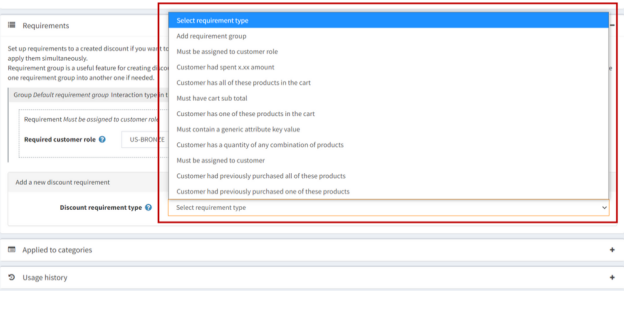
Discount Requirement Types
There are different types of discount types, as follows:
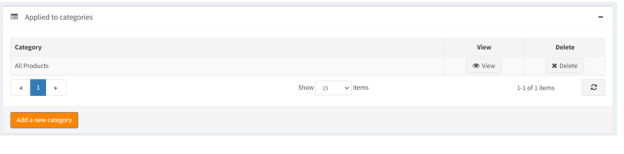
You can Apply a discount to certain categories, such as 'All Products'.
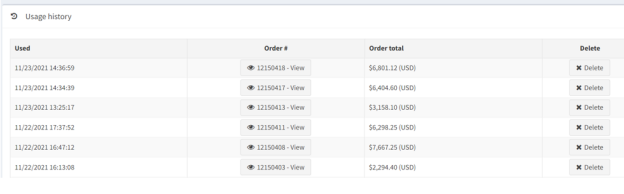
You may also browse by usage history and view when a discount was applied, the order number, and order total.
3. SAP SPECIAL PRICES FOR BUSINESS PARTNERS
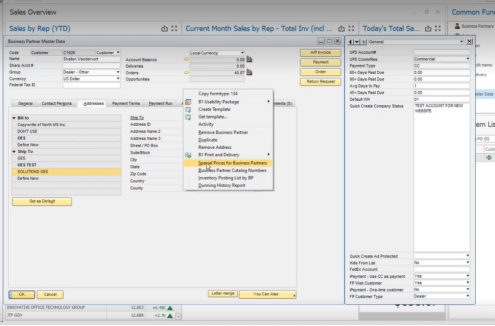
Business Partner Master Data > right click > Special Prices for Business Partners
-
* To set up a training session with our SAP experts or to review your how to add discounts, please contact your project manager!
Was this article helpful?
That’s Great!
Thank you for your feedback
Sorry! We couldn't be helpful
Thank you for your feedback
Feedback sent
We appreciate your effort and will try to fix the article