1. HOW TO WEB ENABLE A BUSINESS PARTNER
-
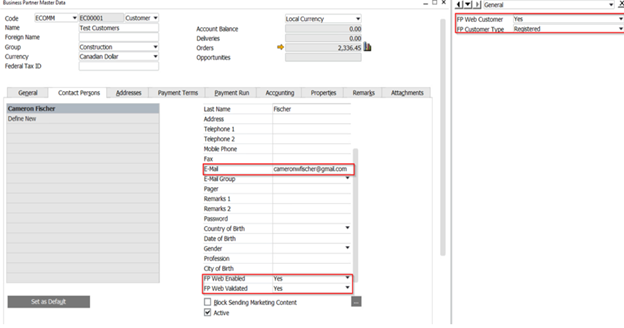
* Open the User defined fields on the BP master by clicking View> User-Defined Fields- Change the FP Web Customer to Yes
- Assign a Customer role to the Business Partner by selecting from the drop down menu
- Update
2. HOW TO WEB ENABLE A CONTACT
-
* Ensure that the Contact has an email address- Change both FP Web Enable and FP Web Validated to ‘Y’
- Update
*****For additional training, please reach out to your Project Manager!
Was this article helpful?
That’s Great!
Thank you for your feedback
Sorry! We couldn't be helpful
Thank you for your feedback
Feedback sent
We appreciate your effort and will try to fix the article