Version 5.2 — Last updated: March 2026 — Internal Technical Reference
1. Architecture Overview
FocusPoint uses Quartz.NET with a persistent ADO Job Store (SQL Server) for SAP integration jobs. Jobs can run in two mutually exclusive locations:
| Component | Process | Scheduler Name | Purpose |
|---|---|---|---|
| Core Scheduler | FocusPoint.Web.UI (IIS / Kestrel) | FocusPoint.Core.Scheduler | Runs all platform jobs + SAP jobs (when enabled) |
| SAP Worker Scheduler | FocusPoint.IntegrationWorker (Windows Service) | FocusPoint.SapWorker.Scheduler | Runs SAP jobs in an isolated process |
Both schedulers share the same Quartz tables (prefix: SCHEDULEJOB_) in the application database but use different SCHED_NAME values to isolate their job data.
2. Operating Modes
The master toggle is SapIntegration:EnableSapJobs in App_Data/appsettings.json:
| Setting | SAP Jobs Run In | Web App Behavior | Worker Behavior |
|---|---|---|---|
"EnableSapJobs": true | Web App (Core Scheduler) | Registers & schedules all SAP jobs on FocusPoint.Core.Scheduler. Cleans up orphaned SapWorker rows. | Worker should not be running, or will duplicate work. |
"EnableSapJobs": false | Integration Worker (SapWorker Scheduler) | Does not register SAP job types. Removes orphaned SAP job entries from core scheduler via SQL. | Creates dedicated scheduler, registers & runs all SAP jobs. Cleans up orphaned SAP jobs from core scheduler. |
Important: Only ONE mode should be active at a time. Running both will cause duplicate message processing, race conditions, and data corruption.
3. Scheduler Instances
| Property | Core Scheduler | SAP Worker Scheduler |
|---|---|---|
| Scheduler Name | FocusPoint.Core.Scheduler | FocusPoint.SapWorker.Scheduler |
| DB Table Prefix | SCHEDULEJOB_ (shared) | |
| Job Group | Main (shared) | |
| Clustering | Yes | Yes |
| Max Concurrency | 10 (default) | 5 |
| Misfire Threshold | 60s (default) | 240s |
| Hosted By | AddQuartzHostedService in ASP.NET | Manual StartSapScheduler() call |
| Contains | Platform jobs + SAP jobs (when enabled) | SAP jobs only |
4. SAP Job Registry
All SAP jobs are defined in SapServiceRegistration.ScheduleSapJobs() and mapped to interval groups:
| Group | Default Interval | Min | Jobs |
|---|---|---|---|
| FEEDER (high) | 30s | 15s | FileReaderJob |
| CRITICAL (high) | 30s | 15s | SalesOrderConfirmationJob, SalesQuoteConfirmationJob, OrderUpdateJob, QuoteUpdateJob, NewUserResponseJob, ShipmentAdviceJob, PaymentCaptureJob, InvoiceReceiptJob, SalesDraftReceiptJob |
| MEDIUM | 60s | 30s | SapCustomerJob, BusinessPartnerContactJob, SalesEmployeeJob, TaxInfoJob, ItemMappingJob, JsonMessageJob, SapOuboundBPJob |
| HEAVY | 2x medium | 120s | ItemJob, InventoryJob, BPAddressesJob |
| LOW | 60s | 60s | SapPromotionJob, ServiceContractJob, BusinessPartnerCategoryJob |
Intervals are configurable via SAPIntegrationSettings in the admin panel and applied at startup via RescheduleJobIntervalsAsync().
5. Configuration Reference
App_Data/appsettings.json
| Key | Type | Default | Description |
|---|---|---|---|
SapIntegration:EnableSapJobs | bool | true | Master toggle. true = web app runs SAP jobs. false = worker runs them. |
SapIntegration:WorkerEndpointUrl | string | "" | Base URL of the worker's health/API endpoint (for forwarding requests). |
SchedulerSettings:NodeName | string | IntegrationWorker-01 | Unique node ID. Used as Windows Service suffix and log file prefix. |
HealthCheck:Port | int | 5100 | Worker's HTTP port for /health and /ready endpoints. |
Database Settings (Admin Panel)
| Setting | Default | Description |
|---|---|---|
JobIntervalHighPrioritySeconds | 30 | Interval for FEEDER and CRITICAL jobs (min 15s) |
JobIntervalMediumPrioritySeconds | 60 | Interval for MEDIUM jobs (min 30s) |
JobIntervalLowPrioritySeconds | 60 | Interval for LOW jobs (min 60s) |
6. Startup Behavior
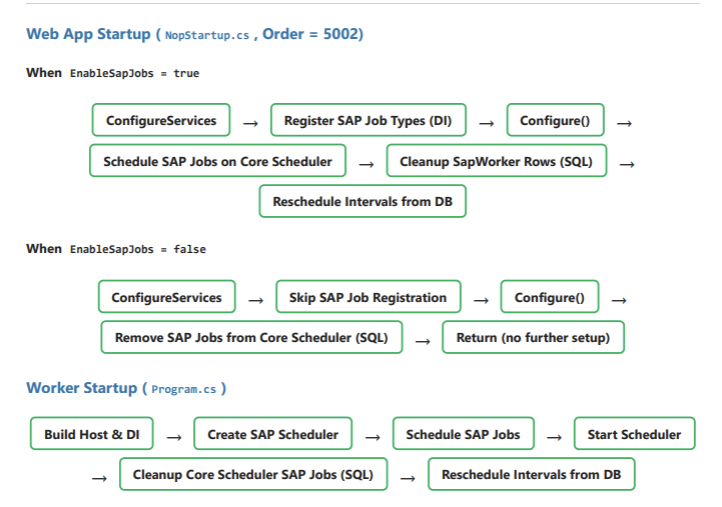
Web App Startup (NopStartup.cs, Order = 5002)
When EnableSapJobs = true:
ConfigureServices → Register SAP Job Types (DI) → Configure() → Schedule SAP Jobs on Core Scheduler → Cleanup SapWorker Rows (SQL) → Reschedule Intervals from DB
When EnableSapJobs = false:
ConfigureServices → Skip SAP Job Registration → Configure() → Remove SAP Jobs from Core Scheduler (SQL) → Return (no further setup)
Worker Startup (Program.cs)
Build Host & DI → Create SAP Scheduler → Schedule SAP Jobs → Start Scheduler → Cleanup Core Scheduler SAP Jobs (SQL) → Reschedule Intervals from DB
7. Database Cleanup Logic
Cleanup is performed via CleanupSapSchedulerEntriesAsync() using direct SQL (not Quartz API) because the target scheduler instance may not be started or even created in the current process.
| Caller | Parameters | What It Cleans | Why |
|---|---|---|---|
Web App (EnableSapJobs=true) | cleanupSapWorkerScheduler: true | All rows where SCHED_NAME = 'FocusPoint.SapWorker.Scheduler' | SapWorker rows are orphaned — no worker is running, web app owns SAP jobs. |
Web App (EnableSapJobs=false) | removeSapJobsFromCoreScheduler: true | SAP job rows where SCHED_NAME = 'FocusPoint.Core.Scheduler' and JOB_NAME IN (<SAP jobs>) | SAP jobs in core scheduler are orphaned — worker owns them now. Non-SAP platform jobs are untouched. |
| Integration Worker | removeSapJobsFromCoreScheduler: true | Same as above (targeted SAP jobs from core scheduler) | Worker is taking over — ensure core scheduler doesn't also fire SAP jobs. |
SQL Deletion Order (FK Dependencies)
Quartz tables have foreign key constraints. Rows must be deleted in this order:
| Step | Table | Reason |
|---|---|---|
| 1 | SCHEDULEJOB_SIMPLE_TRIGGERS | FK to TRIGGERS |
| 2 | SCHEDULEJOB_CRON_TRIGGERS | FK to TRIGGERS |
| 3 | SCHEDULEJOB_SIMPROP_TRIGGERS | FK to TRIGGERS |
| 4 | SCHEDULEJOB_BLOB_TRIGGERS | FK to TRIGGERS |
| 5 | SCHEDULEJOB_FIRED_TRIGGERS | Independent |
| 6 | SCHEDULEJOB_TRIGGERS | FK to JOB_DETAILS |
| 7 | SCHEDULEJOB_JOB_DETAILS | Root table |
| 8 | SCHEDULEJOB_PAUSED_TRIGGER_GRPS | Only for full scheduler cleanup |
| 9 | SCHEDULEJOB_SCHEDULER_STATE | Only for full scheduler cleanup |
| 10 | SCHEDULEJOB_LOCKS | Only for full scheduler cleanup |
| 11 | SCHEDULEJOB_CALENDARS | Only for full scheduler cleanup |
Note: Steps 8–11 are only executed for full scheduler cleanup (cleanupSapWorkerScheduler). Targeted SAP job removal (removeSapJobsFromCoreScheduler) only deletes steps 1–7 filtered by job name.
8. Cache Invalidation (Worker Mode)
When the Integration Worker processes SAP inbound messages that modify products, the product price cache in the web app process must be invalidated. The worker cannot clear this cache directly because it lives in a separate process.
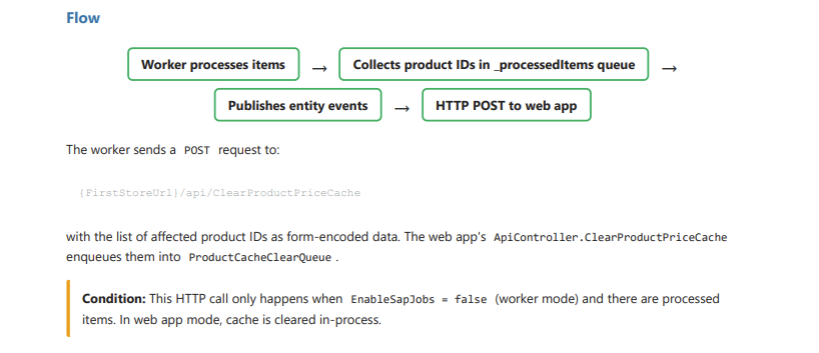
Flow:
Worker processes items → Collects product IDs in _processedItems queue → Publishes entity events → HTTP POST to web app
The worker sends a POST request to {FirstStoreUrl}/api/ClearProductPriceCache with the list of affected product IDs as form-encoded data. The web app's ApiController.ClearProductPriceCache enqueues them into ProductCacheClearQueue.
Condition: This HTTP call only happens when EnableSapJobs = false (worker mode) and there are processed items. In web app mode, cache is cleared in-process.
9. Setup & Deployment
Scenario A: SAP Jobs in Web App (Default)
No additional setup required. SAP jobs run on the core scheduler inside the web app process.
// App_Data/appsettings.json (web app)
{
  "SapIntegration": {
    "EnableSapJobs": true    // <-- default, can be omitted
  }
}
Scenario B: SAP Jobs in Integration Worker
Step 1: Configure Web App
// App_Data/appsettings.json (web app)
{
  "SapIntegration": {
    "EnableSapJobs": false,
    "WorkerEndpointUrl": "http://localhost:5100"
  }
}
Step 2: Deploy Worker via PowerShell
# Basic deployment (reads settings from appsettings.json)
.\deploy-worker.ps1

# Deploy for a specific client
.\deploy-worker.ps1 -NodeName "IntegrationWorker-Acme" `
                    -Database "AcmeDB" `
                    -DataSource "SQL01" `
                    -HealthCheckPort 5101

# Deploy multiple workers (multi-tenant)
.\deploy-worker.ps1 -NodeName "Worker-ClientA" -Database "ClientA_DB" -HealthCheckPort 5100
.\deploy-worker.ps1 -NodeName "Worker-ClientB" -Database "ClientB_DB" -HealthCheckPort 5101
Step 3: Verify
# Check service status
sc query "FocusPoint.IntegrationWorker.IntegrationWorker-Acme"

# Health check
curl http://localhost:5101/health

# Readiness check
curl http://localhost:5101/ready
Deploy Script Parameters
| Parameter | Required | Default | Description |
|---|---|---|---|
-NodeName | No | From appsettings or IntegrationWorker-01 | Unique identifier, used as service name suffix |
-OutputPath | No | C:\Services\FocusPoint.IntegrationWorker.<NodeName> | Installation directory |
-Database | No | From appsettings | SQL Server database name (shorthand) |
-DataSource | No | From appsettings | SQL Server instance (shorthand) |
-ConnectionString | No | From appsettings | Full connection string (overrides Database/DataSource) |
-HealthCheckPort | No | 5100 | HTTP port for health endpoints |
-Uninstall | No | — | Stop and remove the Windows Service |
-SkipPublish | No | — | Skip dotnet publish, use existing binaries |
10. Operational Commands
Windows Service Management
| Action | Command |
|---|---|
| Install service | .\deploy-worker.ps1 -NodeName "Worker-01" |
| Start service | sc start "FocusPoint.IntegrationWorker.Worker-01" |
| Stop service | sc stop "FocusPoint.IntegrationWorker.Worker-01" |
| Check status | sc query "FocusPoint.IntegrationWorker.Worker-01" |
| Uninstall service | .\deploy-worker.ps1 -NodeName "Worker-01" -Uninstall |
| View logs | Get-Content "C:\Services\...\Logs\Worker-01-*.log" -Tail 100 -Wait |
Manual CLI (without deploy script)
| Action | Command |
|---|---|
| Run in console | dotnet run --project Workers/FocusPoint.IntegrationWorker |
| Install as service (built-in) | FocusPoint.IntegrationWorker.exe --install |
| Uninstall service (built-in) | FocusPoint.IntegrationWorker.exe --uninstall |
Manual Database Cleanup (SQL)
-- View all SAP jobs in the core scheduler
SELECT JOB_NAME, JOB_GROUP, SCHED_NAME
FROM SCHEDULEJOB_JOB_DETAILS
WHERE SCHED_NAME = 'FocusPoint.Core.Scheduler'
  AND JOB_NAME IN ('FileReaderJob','SalesOrderConfirmationJob',
      'SalesQuoteConfirmationJob','OrderUpdateJob','QuoteUpdateJob',
      'NewUserResponseJob','ShipmentAdviceJob','PaymentCaptureJob',
      'InvoiceReceiptJob','SalesDraftReceiptJob','SapCustomerJob',
      'BusinessPartnerContactJob','SalesEmployeeJob','TaxInfoJob',
      'ItemMappingJob','JsonMessageJob','SapOuboundBPJob','ItemJob',
      'InventoryJob','BPAddressesJob','SapPromotionJob',
      'ServiceContractJob','BusinessPartnerCategoryJob');

-- View all SapWorker scheduler entries
SELECT JOB_NAME, JOB_GROUP, SCHED_NAME
FROM SCHEDULEJOB_JOB_DETAILS
WHERE SCHED_NAME = 'FocusPoint.SapWorker.Scheduler';

-- View scheduler state (which nodes are connected)
SELECT * FROM SCHEDULEJOB_SCHEDULER_STATE;
Warning: Do not manually delete Quartz rows while the owning scheduler is running. Stop the service first, then delete, then restart.
11. Troubleshooting
| Symptom | Cause | Fix |
|---|---|---|
SAP jobs still in DB after setting EnableSapJobs=false | Cleanup uses direct SQL and runs during Configure(). If the web app crashes before reaching that point, cleanup doesn't execute. | Restart the web app. If the issue persists, run the cleanup SQL manually (see Section 10). |
| Duplicate message processing | Both web app and worker are running SAP jobs simultaneously. | Ensure EnableSapJobs is false on the web app when using the worker. Restart the web app after changing the setting. |
| Worker starts but jobs don't fire | SAP job types not registered in DI, or scheduler not started. | Check worker logs for startup errors. Verify the worker's App_Data/appsettings.json has the correct connection string. |
| Product prices stale after worker processes items | Worker cannot clear web app's in-memory cache directly. | Verify the first store URL is reachable from the worker. Check worker logs for "Failed to notify web app to clear product price cache". |
SCHEDULEJOB_LOCKS row stuck | Scheduler crashed while holding a DB lock. | Stop all schedulers, delete the stuck lock row, restart. |
| Port conflict on worker | Multiple workers using the same HealthCheck:Port. | Assign unique ports per node: -HealthCheckPort 5100, 5101, etc. |
FocusPoint Platform — SAP Job Scheduler Architecture — Internal Document — March 2026
Was this article helpful?
That’s Great!
Thank you for your feedback
Sorry! We couldn't be helpful
Thank you for your feedback
Feedback sent
We appreciate your effort and will try to fix the article